Halftone AI Prompts: The Dots Only Work at One Size
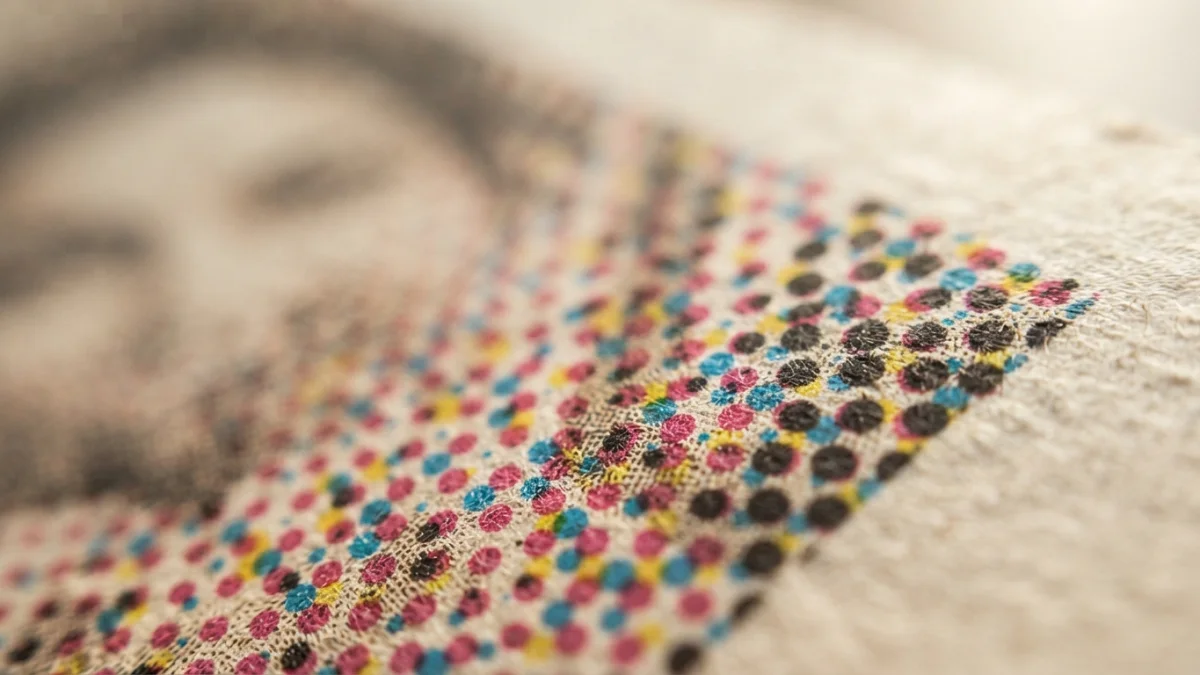
Image generated with AI.
A halftone is a press measurement, not a filter: the dot pitch is fixed before the image exists. Ask a model for "halftone" and you get dots sized for the preview, which is why the same file reads as print on a thumbnail and as noise at final size.
A halftone is a press measurement, not a filter. The pitch of the dots is decided before the image exists, by a press and a sheet of paper that know nothing about your prompt. Halftone AI prompts are rarely missing adjectives. They are missing a number.
Ask a model for "halftone" and it draws dots sized for the preview on your screen, so the same file reads as print on a thumbnail and as noise at final size. What follows: where that number comes from, how to choose it, and how to check the render.
Why a Halftone Is a Number, Not a Filter
On a press, tone is not a gradient. It is a grid of dots, and each dot's size decides how much ink lands on that spot of the sheet. The grid never moves; only the dots grow or shrink, which is why the method is called amplitude modulation, or AM screening. The grid is a measurement: a distance between dots, repeated across the sheet. A filter paints dots onto pixels instead, so they travel with the image and change size when it is scaled. At 100 percent the two look similar. Print them and only one behaves.
Lines per Inch Is the Only Real Word
Screen ruling is measured in lines per inch, or lpi: the number of lines of dots in one inch, counted parallel to the angle of the screen. At 60 lpi the dots are visible across a room; at 175 lpi on coated stock you need a loupe. The number describes a distance, not a look, which is why a prompt cannot set it: the model has no inches. More at the Halftone reference.
Four Screens, Four Angles
Four inks means four screens stacked. At the same angle the patterns would land on each other and produce moire, so each separation is rotated, conventionally around 30 degrees apart, with yellow often at 15 degrees. A model can draw a convincing rosette. What it cannot do is commit to an angle and hold it across every square inch, because it never had one.
Decide the Final Size Before You Generate
The ruling you can actually have is limited by two things, in this order: the pixels in your file, then the inches on the sheet. Both must be fixed before you generate: there is no later moment when the model can learn them.
Dots Across Divided by Inches Across
The arithmetic is one division. Count the dots across the printed piece and divide by that width in inches: the result is your effective lpi. A dot needs at least one pixel, so pixel width divided by printed width is your ceiling, not your target.
A worked example. A 1,024-pixel file at 30 cm wide is 11.8 inches, and 1,024 divided by 11.8 gives about 87 lpi. To reach 150 lpi across those same 11.8 inches you need 150 times 11.8, roughly 1,772 pixels of width.
Why a 1,024-Pixel File Cannot Be a Fine Screen
A fine screen is a short distance between dots, which means many dots, which means many pixels. The budget is spent in the file, not in the prompt. A coarse screen is not an error, it is a decision. What you cannot do is ask for 150 lpi on a file with no pixels to carry it: the model will not refuse, it will draw dots that look right at preview size, which is the worst outcome because you will ship them.
Prompt 1 - The Four-Ink Object
The starting point for the four-ink case is the catalog prompt for a halftone CMYK offset object, the one entry naming both things that make an image look printed rather than rendered: an area of dot instead of a smooth gradient, and a plate that drifted instead of a perfect register. Do not expect a measurement from it. The listing declares no lpi, no direction of drift and no substrate, which is why the press card below belongs outside the prompt.
What That Prompt Actually Describes
Three ideas stacked in one name. Halftone gives the screen. CMYK gives four inks, four angles and the possibility of a rosette. Offset gives the drift of one plate against the others. A flat background hides misregistration; a high-contrast edge exposes it.
The Registration Tell
Pick a hard edge, the silhouette against the background, and look at the colour fringing at 100 percent. A press gives one displacement, in one direction, constant across the image, because the plate is off and stays off. A model gives a different displacement at every edge, or a soft coloured blur that reads as a glow. Check two opposite edges, never one. For scale, at 150 lpi printing traps are often set between 1/150 and 1/300 of an inch, the order of magnitude of a plate being out rather than a decorative target. Reference: printing trap.
Prompt 2 - The One-Ink Image
The one-ink case is served by the monochrome high contrast studio portrait pack, and the reason to reach for it is not the portrait. Skin and cloth are the most demanding surfaces for a single ink: clipping shows there first. The pack asks for deep shadows and dramatic contrast, exactly where the decision gets made.
One Ink Means Tone Is the Only Information
With no colour there is no second signal. Contrast is the entire budget, and clipping both ends is a declared decision, not an inherited quality. Name what survives: shadow detail held in the midtones, highlights not blown. High contrast alone says nothing about which end it sacrifices.
Dot Gain, or Why Print Comes Back Darker
Ink spreads when it meets paper. The printed dot ends up larger than the dot in the file, and in a halftone that pushes the tonal value down, so the sheet comes back darker than intended. This is dot gain, a property of the physical process, not of your render. A screen has no gain, which is why a monochrome that looked crisp on a monitor lands flat and muddy in the shadows. High contrast in a prompt is not high contrast on paper: bring the extremes in. The correction curve belongs to the printer, who knows their press, paper and gain figure. Background at the dot gain entry.
The Press Card: Four Lines to Put in Your Halftone AI Prompts
Write these before you generate and paste them unchanged into every generation of the set. They turn a style word into a specification.
- Final width: the image will print at ___ inches wide.
- Ink count: one ink (monochrome) or four inks (CMYK process).
- Screen ruling target: ___ lpi, and therefore ___ dots across the file at that width.
- Substrate: coated (sharper dots, less spread) or uncoated (dots spread, midtones darken).
If you cannot fill in line three with a number, you are not making a screen. You are buying a filter.
The Three Checks After You Generate
- The division. Count the dots across one inch of the final image, divide by the printed inches, compare to line three of the card.
- The registration. Two opposite edges at 100 percent. One direction and one magnitude, or it is not a press.
- The gain. One small proof at final size. If the midtones collapse into mud, the image was designed for a monitor.
- The honest preview. Look at the piece at the distance it will be seen. A poster read from three metres does not need 150 lpi.
What the Model Cannot Know
Your lpi, your paper, the inks the shop will run, the final width in inches, the gain curve of their press: none of it is in the prompt, and none of it can be read off the picture. And between two runs the model does not guarantee the same screen. What you buy is something plausible. What you do afterwards is measure it.
FAQ
What is the difference between a halftone and a halftone filter?
A screen has a fixed frequency that stays put when print size changes. A filter draws dots attached to pixels, so they scale with the image and stop being a screen the moment the file is resized.
How many dots per inch do I need?
At most one dot per pixel. Divide the pixel width by the printed width in inches and you have your ceiling in lpi, whatever the prompt says.
Why does my monochrome image look flat when printed?
Dot gain. Ink spreads on contact with paper, the printed dot is bigger than the file dot and the midtones darken. On screen that effect does not exist.
Can I just add grain instead?
Grain is film noise, not a screen. It does not build tone out of dot area, so it works as texture over an image, never as a substitute.
Both prompts are starting points. The measurement is yours, and it is four lines long: width, ink count, ruling, substrate.
LikePrompts Editorial
Practical guides for getting the most out of AI prompts — written by the LikePrompts team.