How to Create Consistent Characters Across Images: Midjourney, Flux, and DALL-E
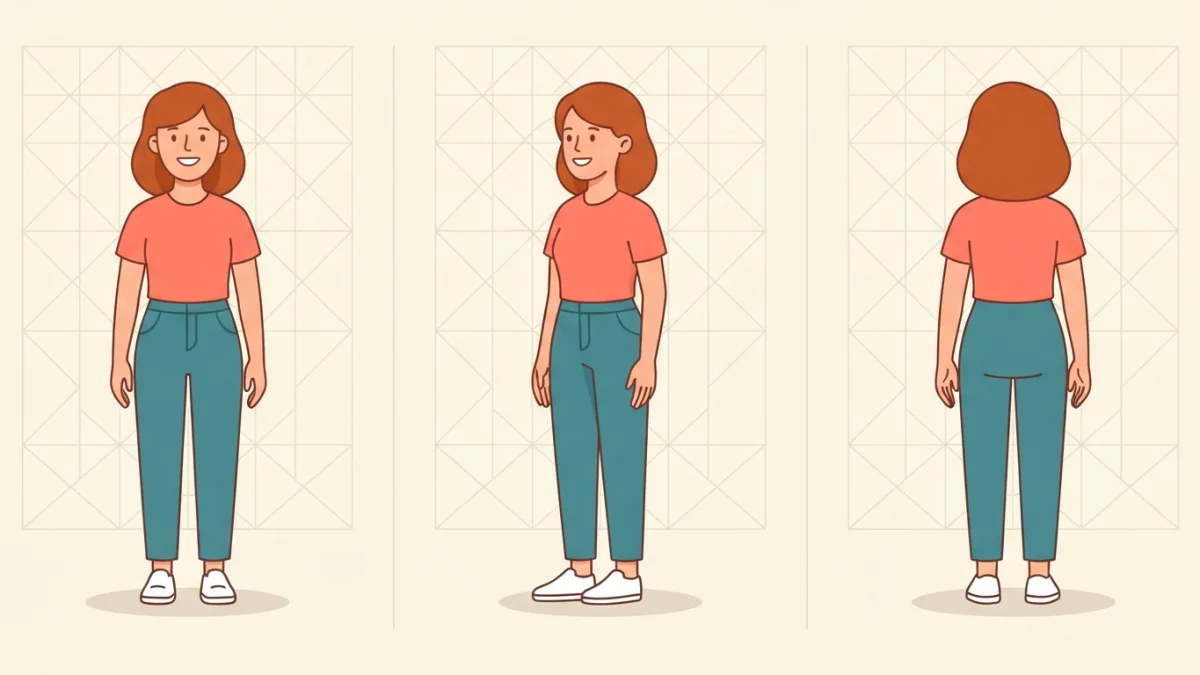
Image generated with AI.
Same face, same outfit, same character in every image - no manual editing. This is how Midjourney --cref, seed locking, and identity blocks really work, with copy-paste formulas for Flux and DALL-E too.
Creating consistent characters across images is the hardest problem in AI image generation. Drift is not random: models rebuild an identity in every composition. This guide covers the three fixes that work - Midjourney character reference, seed locking, and identity blocks.
Every generation starts from noise and rebuilds the scene from your prompt. The model never stores the character anywhere; it re-creates recognizable traits: hair, face shape, clothing, proportions. Change one word that describes those traits and the identity shifts. Consistency is not a quality of the model. It is a property of the prompt, and the three methods below are different ways to make that definition stronger.
Why Characters Drift (and What Actually Keeps Them Stable)
What looks like the same person in two images is the model re-creating recognizable traits inside each new composition. A weak prompt leaves the identity undefined, so the model fills the gap with whatever scene it builds. A strong prompt defines the identity tightly enough that the model keeps returning to the same character.
The Rebuild Problem
The practical consequence: consistency is a property of the prompt, not a hidden feature of the model. If the prompt does not anchor the identity, the drift is not a bug - it is the model doing exactly what you asked.
Method 1 - Midjourney Character Reference (--cref and --cw)
Midjourney's native solution is Character Reference. You pass a picture with --cref, and the model reads recognizable traits such as hair color, clothing, and facial features, then uses them in new scenes. It is not a face paste: the reference conditions the generation toward known identity cues, which gives flexibility but also room for drift.
How --cref Works
Keep the same reference URL for the whole series. Midjourney matches the identity cues it detects in that image, so swapping references mid-series is the fastest way to lose the character.
The --cw Dial: 100, 75-85, 50, 0
Character weight, controlled with --cw, decides how much of the reference the model must preserve. It runs from 0 to 100, and the default is 100.
- --cw 100 locks everything: face, hair, outfit, and body proportions. Perfect for portraits, wrong when you want to change the clothing.
- --cw 75-85 is the sweet spot for series. The face still reads as the same person, while the outfit can vary slightly.
- --cw 50 keeps face and hair and lets the prompt control the clothing.
- --cw 0 keeps only the facial template, ideal for a completely different outfit or hairstyle.
Newer versions move the same idea forward: Midjourney V7 uses --oref (Omni Reference) with an Omni Weight scale of 0-1000, where around 100 is a balanced starting point. The workflow is the same - lock a reference, then tune how strongly it applies.
Start From a Clean Base Reference
Generate a clean portrait with Midjourney itself instead of using a cropped photo or a noisy screenshot. A dirty base contaminates every image built from it, and no amount of prompt tuning fixes a blurry or mixed reference.
Method 2 - Seed Locking and Identity Blocks (Flux and Stable Diffusion)
Flux and Stable Diffusion have no --cref, so consistency comes from a three-part recipe: a reference image, a fixed seed, and identical words every time. The seed is the random starting point of a generation; the same seed with the same prompt tends to reproduce the same layout and style, which makes it a cheap and reliable anchor.
Reference Image + Fixed Seed + Identical Words
In Stable Diffusion, the same seed plus the same prompt gives you the same person. Change either one and the identity drifts. Load your master portrait, lock the seed with --seed, and paste the exact same character description into every prompt. Do not rewrite the description with synonyms: "a young woman with copper hair" and "a girl with reddish hair" read as different identities to the model even though a human sees the same person. Copy the block word for word.
Face Tools: IP-Adapter and InstantID
When a real face must stay recognizable, add IP-Adapter or InstantID. IP-Adapter steers the composition toward a reference image, while InstantID is built specifically for faces. Load the master portrait into one of these tools, keep the seed fixed, and paste the locked description. This combination is the standard way to keep a face consistent in SD and Flux workflows.
Write a Locked Identity Block
An identity block is a reusable paragraph that describes the character once and gets pasted identically into every generation:
Character: Mara, 30s, medium-length auburn hair, green eyes, round face,
olive skin, denim jacket over a white t-shirt, black jeans, red sneakers.
Art style: clean vector illustration, soft shadows, warm cream background.
Because the block is plain text, it works in any model, including tools with no reference-image support at all.
Method 3 - Character Sheets and Turnarounds (DALL-E and Anime Workflows)
DALL-E and ChatGPT have no --cref and no seed parameter either. Consistency has to come from a reusable character description plus a fixed art style. That sounds fragile, but it works when the description is specific enough and the wording never changes.
The Front-Side-Back Sheet
The most reliable pattern is the character sheet: ask for three views of the same character - front, side, and back - with identical outfit and hair color in all of them. This locks the design in a single generation, and the result becomes your reusable reference. It is the standard pattern in anime and concept art, and the basis of the FLUX.2 Klein Anime Character Sheet prompt in our catalog.
Brand Characters With Fixed Descriptions
For mascots and brand characters, flat vector characters work especially well. Describe the character once - shape, colors, style - and add the instruction that the consistent character must appear across poses. Sets generated this way keep the visual identity stable between poses, which is exactly what you need for stickers, social avatars, and brand illustrations. The Flat vector cute characters set prompt uses this pattern with brand-friendly colors.
The Workflow That Keeps Consistent Characters Across Images
Whichever method you pick, the professional workflow is the same. Three steps, repeated for every image in the series.
Step 1: Lock the Design in a Reusable Description
Write the identity block first: face, hair, outfit, palette, art style. This is your source of truth and it never changes while the series is running.
Step 2: Generate One Strong Reference
Use the locked description to generate the best single image of the character you can. This becomes the reference for Midjourney, the master portrait for IP-Adapter or InstantID, or the target for your character sheet. One strong reference beats ten mediocre attempts.
Step 3: Reuse the Same Prompt Skeleton
Keep a template with the identity block, the seed, and the style settings. Each new image only changes the scene part: pose, background, lighting. The character part stays identical and the seed stays locked. This is what makes a series look like a series instead of a collection of lookalikes.
Three Prompts That Already Solve Consistency
If you do not want to assemble the formula from scratch, our catalog has prompts with these techniques built in.
- MJ Character Portrait Series - a Midjourney portrait formula that keeps the same identity in every shot.
- FLUX.2 Klein Anime Character Sheet - a character sheet with front, side, and back views that keeps the design identical.
- Flat vector cute characters set - a DALL-E prompt for brand characters that stay consistent across poses.
Each prompt is a copy-paste shortcut for one of the three methods above, so you can test the technique in seconds instead of tuning parameters for an hour.
Common Mistakes That Break Consistency
Most consistency failures come from four repeated mistakes:
- Text fighting the reference. At
--cw 100, describing clothes that differ from the reference makes the text and the image compete, and the output degrades. Remove the clothing words or drop the weight to 0. - Changing the seed mid-series. A new seed means a new starting point and a new interpretation of the identity. Lock it and leave it.
- Describing outfits at high character weight. At
--cw 100the reference dominates the clothing. If you want outfit changes, lower the weight instead of fighting the reference with words. - Starting from a dirty reference. A blurry crop or a noisy screenshot poisons the whole series. Regenerate a clean base before you commit.
Keep those four out of your workflow, and consistent characters across images stop being a lottery. Lock the identity once, reuse the same words, and let the scene change around a character that finally stays the same. For more context, see Midjourney's official documentation on Character Reference, or the Stable Diffusion guide on prompting for consistency.
LikePrompts Editorial
Practical guides for getting the most out of AI prompts — written by the LikePrompts team.